
This message indicates that the PC user has entered a wrong password a number of times and as a result of which, Windows has locked the account and prevented them from signing in for a particular period of time Windows does not display the specified lock out time, but it’s typically somewhere between 10 and 30 minutes. While
Once you encounter “The referenced account is currently locked out and may not be logged on to” error, we would strongly recommend you leave the PC for 30 minutes. After 30 minutes, the log-in screen may be unlocked, and you may get a second chance to access your desktop.
From experience, it’s worth trying to log into the PC from another computer via Remote Desktop. The account lock out may only be set to prevent access to the PC using the keyboard.
Once you have managed to access your desktop successfully, you should disable the Account lockout threshold policy to prevent “The referenced account is currently locked out and may not be logged on to” error from showing up again.
Fixing this problem involves editing the Windows Registry. Be very careful when using the instructions below. Follow the instructions exactly and do not change anything else. If you don’t feel confident to continue, please seek assistance.
Make sure that you back up the registry before you modify it. Make sure that you know how to restore the registry if a problem occurs.
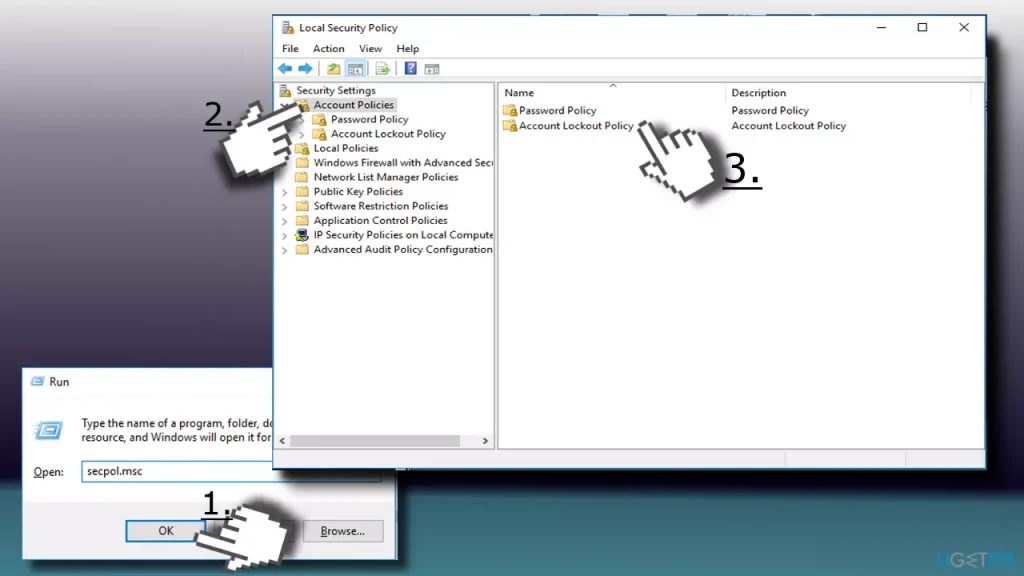
- Press Windows key + R, type secpol.msc, and hit Enter.
- When the Local Security Policy window opens, select Security Settings.
- Open Account Policy and select Account Lockout Policy.
- Double-click on the Account lockout threshold policy (on the right) to open Settings configuration window.
- To disable account lockout, replace the existing value with 0 and click Apply to save the changes.
- Then press OK and close the Local Security Policy window.

- Restart the PC
The information here was taken from this website:
https://ugetfix.com/ask/how-to-fix-the-referenced-account-is-currently-locked-out-and-may-not-be-logged-on-to-error-on-windows-10/